Digital Knife Workflow for Custom Parts — from CAD file to finished gasket in 7 steps, ±0.1 mm tolerance, no physical tooling required.
By Doris Li, HORISTAR CNC Application Team · Published July 7, 2026 · Updated July 7, 2026
Workflow Overview
1
Prepare Drawing
2
Confirm Material
3
Select Tool
4
Vacuum Hold-Down
5
Nest Parts
6
Sample Cut
7
Cut & Inspect
Quick Answer
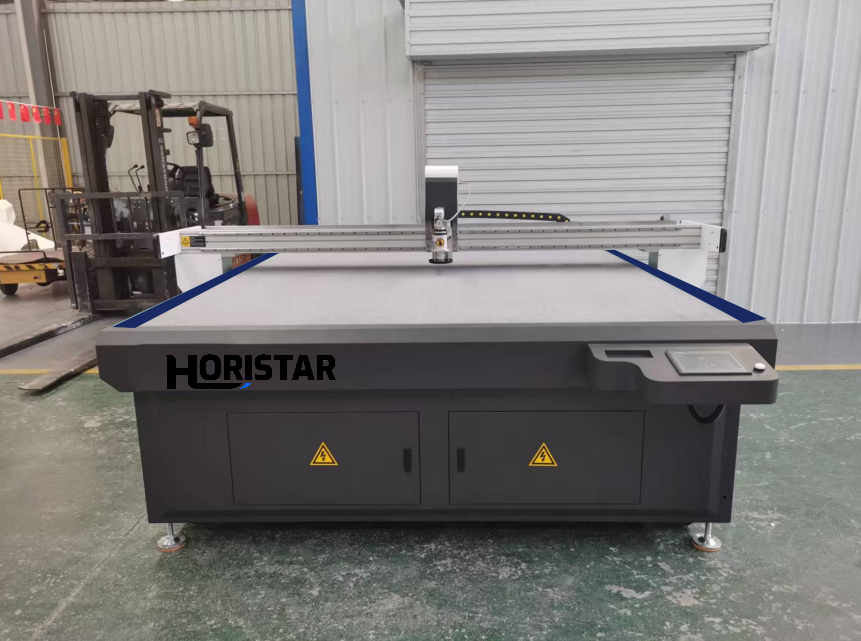
Rubber gaskets can be cut without dies using a CNC digital knife (oscillating knife) cutting machine. The workflow: prepare the gasket drawing, select the correct rubber sheet, import a DXF file, nest the parts, choose the knife tool, test cutting parameters, and cut with vacuum hold-down. The HORISTAR HM-1625 cuts 0.1–50 mm thick material to ±0.1 mm and supports DXF, PLT, PDF and AI files.
When Die-Free Gasket Cutting Makes Sense
You produce many gasket shapes
Orders are small or medium batch
Drawings change frequently
Maintenance teams need quick replacement parts
Die-making cost is too high for low volume
Fast prototypes are required
You cut rubber, silicone, cork, foam or soft composite sheets
DXF or CAD drawings already exist
For one stable shape in very high quantity, die cutting may still be faster per piece.
1
Step 1
Prepare the Drawing
A clean digital file is the best starting point. DXF is commonly used; the HM-1625 also accepts PLT, PDF and AI. Before importing the file, confirm the following:
Pre-Import File Check
Outer shape and inner holes are closed paths
Duplicate or overlapping lines removed
Scale and units confirmed (mm or inches)
Minimum hole size is realistic for the blade
Tolerance confirmed before sending to cutter
If only a physical gasket exists, it may need scanning or redrawing. HORISTAR’s instant version-withdrawal software can convert a photo or cardboard outline into a cutting file with automatic correction.
2
Step 2
Confirm the Material
Rubber is not one material. Thickness, hardness and elasticity all affect cutting quality.
Material Factor
Why It Matters
Thickness
Affects blade length, speed and number of passes
Hardness
Harder rubber needs different speed and pressure parameters
Elasticity
Soft material may stretch if not held well by vacuum
Surface texture
Affects vacuum holding strength and sheet movement
Adhesive backing
May require kiss-cut or liner depth control
Fibre reinforcement
May cause fraying or edge resistance — test first
Always test the actual material before committing to batch production.
3
Step 3
Select the Knife Tool
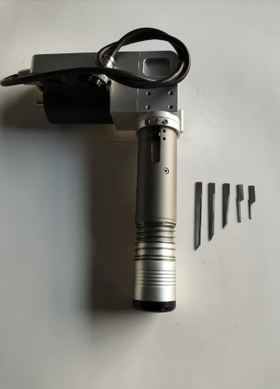
The HM-1625 carries a double head that can combine several tools. Choose by material thickness and behaviour:
Oscillating Knife
Best for thicker rubber, foam, cork and soft composite sheets where reciprocating action prevents drag and tearing.
Drag Knife
Ideal for thin, flexible sheets and simple shapes where the blade trails behind and self-orients to the cut direction.
Kiss-Cut Tool
Cuts only the top layer of adhesive-backed sheets, leaving the release liner fully intact for easy peeling and application.
Creasing / Mark Tool
Applies part numbers, assembly references or inspection marks without cutting through — useful for traceability.
For small holes or tight corners, the tool tip diameter and blade geometry matter most. Confirm with a sample cut before production.
4
Step 4
Use Vacuum Hold-Down
Rubber sheets can move, stretch or lift during cutting. The HM-1625 uses vacuum adsorption to keep the sheet flat and stable throughout the entire cutting cycle.
Vacuum Best Practices
Use the correct vacuum zone matched to the sheet size
Keep the sheet flat on the bed before starting the cycle
Avoid curled or rolled material — flatten before loading
Use backing paper for thin or perforated materials if vacuum pulls through
Test small holes and narrow strips before committing to full batch
Keep vacuum active until the full cutting cycle finishes
5
Step 5
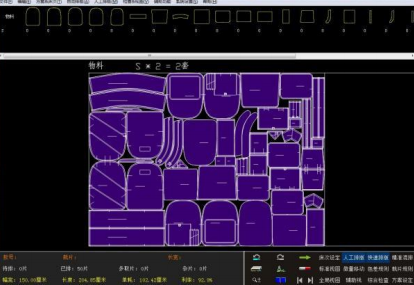
Nest Parts to Reduce Waste
Software Spotlight
HORISTAR Automatic Nesting Software
Over 92% Material Utilisation
Reduces sheet scrap automatically
Combines multiple shapes in one job
Improves production planning & scheduling
Mix sample and batch parts on same sheet
Especially valuable for expensive rubber compounds
Lifetime free software upgrades included
6
Step 6
Run a Sample Cut
Before batch cutting, run a sample and verify each of the following quality points. Adjust speed, knife frequency, pressure, blade type and number of passes as needed.
Outer dimensions within tolerance
Hole sizes correct
Edge quality — no tearing or drag marks
Corner quality — clean transitions
Material does not stretch during cut
No tool drag marks on surface
Backing liner intact (adhesive material)
Part meets tolerance specification
7
Step 7
Cut and Inspect the Batch
After approving the sample, cut the full batch and inspect parts regularly. Record the following for every job to build a reusable cutting database:
Job Record — Fields to Log
Material type and supplier
Sheet thickness and hardness (Shore A)
Tool type and blade serial / batch
Cutting speed (mm/s) and number of passes
Knife frequency and downforce pressure
Vacuum zone and setting level
CAD file name and revision number
Inspection result and measured dimensions
The HM-1625 control platform offers real-time position monitoring and remote internet diagnosis, so operators can re-run jobs with consistent results.
Cutting Sequence Matters
For gaskets with internal holes, cut internal features before the outer contour. If the outer contour is cut first, the part can move before inner holes finish. The recommended sequence:
Step 1Mark reference lines if required
→
Step 2Cut small holes & internal openings
→
Step 3Cut slots & internal profiles
→
Step 4Cut outer contour last
→
Step 5Keep vacuum active until cycle ends
For thin or flexible sheets, cut order can be the difference between a clean gasket and a distorted part.
Digital Knife Cutting vs Manual Gasket Cutting
Factor
Digital Knife Cutting
Manual Cutting
Repeatability
High — ±0.1 mm for repeated shapes
Depends on operator skill
Setup
Digital file and tool setting
Template or manual layout
Best use
Custom shapes, small batches, many SKUs
Repair work and simple one-off jobs
Waste control
Nesting reaches >92% utilisation
Manual layout may waste material
Labour
Lower after initial setup
Higher for repeated work
Design changes
Fast file update — no retooling
New template or manual adjustment needed
CAD File Preparation Details
Pre-Cut File Preparation Checklist
Convert text and marks to paths — only if they need cutting or marking
Remove all duplicate and overlapping lines before import
Join any broken or open curves into closed paths
Separate through-cut, kiss-cut and marking lines onto different layers
Confirm units — millimetres or inches — match the machine setting
Check that hole sizes are not below practical tool capability
Add part number marks only if a marking tool head is fitted
Keep a revision number in the file name for traceability
For replacement gaskets from old parts — redraw from measurement, do not trace a damaged gasket
Engineering Constraints Buyers Should Understand
Die-free gasket cutting is flexible but still controlled by material mechanics and tool geometry.
Measure several pieces from the same batch and compare
For functional gaskets, the key question is not “does it look clean?” but “does it seal, align and assemble correctly?”
Cost Comparison: Digital Cutting vs Die Making
Recommended
Digital Knife Cutting
New shape setupImport or edit a file — no tooling cost
Design revisionUpdate the CAD file — instant
Sample lead timeUsually faster — no die wait
Small batch costOften lower — no die amortisation
High-volume stable partMay be slower per piece at very high volumes
StorageDigital files — zero physical storage
Die Cutting
New shape setupMake a physical die — tooling cost and lead time
Design revisionModify or remake the die — added cost
Sample lead timeSlower if die is not ready
Small batch costDie cost may dominate per-unit cost
High-volume stable partOften efficient after die is amortised
StoragePhysical dies need secure storage space
For maintenance and custom gasket work, digital cutting usually wins because the production mix changes frequently.
Example Inquiry That Gets a Better Quote
Instead of “I need a gasket cutting machine price,” send a message like this:
Sample Inquiry Message
We need to cut rubber and silicone gaskets from DXF files. Material thickness is 1–8 mm, Shore hardness about 60A for most jobs, sheet size 1000 × 1000 mm, minimum hole diameter 6 mm, and most orders are 10–200 pieces per design. Some materials have adhesive backing. Please recommend a digital knife machine, tool package, vacuum configuration and sample testing process.
This gives the supplier enough detail to recommend a machine and configuration instead of a generic price list.
When Not to Use Digital Knife Cutting
The gasket material is metal
The part needs extremely high-volume production of one stable shape
The material is too hard or brittle for knife cutting
The smallest holes are below practical knife-cutting limits
The edge must meet a specification only another process (waterjet, laser) can achieve
Service, Warranty and Support
🧪
Free Sample Testing
Test with your own gasket material before purchase
📹
Remote Video Inspection
Inspect machine before shipment via live video
🛡
2-Year Warranty
Excluding consumables and non-human damage
💾
Lifetime Software Upgrades
Free updates for nesting and drawing software forever
📞
Lifelong Technical Support
Remote and on-site support available
⚡
Fast Operator Training
Operators can start producing within hours of installation
HORISTAR manufactures from a 50,000+ m² base, holds 30+ patents and is ISO, CE and FDA certified.
Send Your Gasket Drawing
HORISTAR can review your gasket drawing and material to recommend the correct digital knife configuration, with free sample testing included.
Material type & thicknessShore hardnessDXF drawing or sample photoMin. hole diameterRequired toleranceSheet size & batch quantityAdhesive backing — yes/no
Yes. A CNC digital knife cutting machine such as the HORISTAR HM-1625 cuts rubber gasket shapes directly from digital files — DXF, PLT, PDF or AI — without requiring a physical die for each shape. This makes it practical for custom, prototype and small-batch gasket production.
What file format is best for digital gasket cutting?
+
DXF is the most commonly used format for gasket cutting. The HM-1625 also accepts PLT, PDF and AI files, and works directly with the HORISTAR nesting software for automatic part arrangement. Before importing, ensure all paths are closed and duplicate lines are removed.
Is digital knife cutting suitable for all rubber materials?
+
Most flexible rubber sheets — including natural rubber, silicone, EPDM, neoprene, cork composites and foam — can be cut with a digital knife. Very hard, reinforced or unusual materials should be evaluated with sample cutting first. Material thickness (0.1–50 mm on the HM-1625) and hardness both affect the cutting parameters.
Can a digital knife cutter cut small gasket holes?
+
Yes, it can cut many small holes, but the minimum practical size depends on material thickness, blade type, and tolerance requirements. The HM-1625 holds ±0.1 mm machine tolerance. For very small holes, always run a sample cut to verify quality before batch production.
When is die cutting better than digital cutting?
+
Die cutting may offer a lower per-piece cost for very high-volume production of a single, stable gasket shape where the die cost is fully amortised. Digital cutting is generally better for custom shapes, frequently changing designs, small-to-medium batches, fast samples, and mixed production where many different gasket shapes are cut in the same facility.