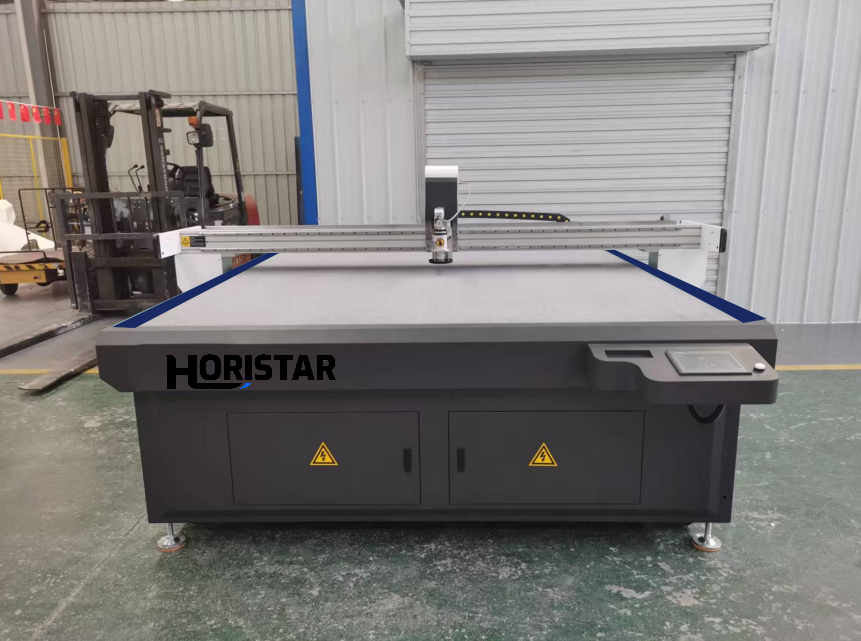
A digital knife cutting machine for packaging samples helps packaging teams cut and crease cartons, inserts, displays, corrugated samples and short-run boxes directly from digital files. It is especially useful when a factory needs fast structural samples before the final die is approved, or when a buyer changes the carton design many times before mass production.
This guide is limited to cartonboard, corrugated board and printed paperboard sample workflows: creasing, V-cutting, register marks and assembly fit. For protective EVA, EPE and PE foam inserts, use the dedicated foam-insert selection guide because material density, blade behavior and cavity fit require a different machine setup.
For approved, repeatable, high-volume packaging, a die-cutting line can still be the faster production choice. Digital knife cutting is different: it is a flexible sample-room and short-run production solution for changing designs, multi-SKU packaging, urgent prototypes, printed carton contour cutting and quotation support.
HORISTAR buyers can start with the digital knife cutting machine page, then send board material, thickness, sheet size, dieline files, crease lines, V-cut needs, printed registration marks and daily sample volume. Based on those inputs, HORISTAR can recommend the working table size, tool heads, vacuum table, camera positioning and software workflow.
By: Doris Li, HORISTAR CNC Application Team. Doris works with overseas buyers on CNC machine selection, sample testing, quotation inputs and pre-shipment checks for HORISTAR machinery projects.
Updated: 2026-08-10
Estimated read time: 11 minutes
Key Takeaways
- Choose digital knife cutting when carton designs change often or sample approval is urgent.
- Packaging samples normally need more than through-cutting. Creasing, V-cutting, kiss-cutting, marking and printed registration should be confirmed before quotation.
- For carton and corrugated board work, evaluate cut quality, crease quality, vacuum holding, corner accuracy and assembly fit, not only maximum machine speed.
- The HORISTAR HM-1625 configuration is a practical starting point for packaging sample rooms when the required sheet size fits a 1600 x 2500 mm working area.
- Ask for a real sample test with your own material, thickness, dieline and printed sample before confirming the final machine configuration.
When Packaging Buyers Should Use Digital Knife Cutting
Digital knife cutting is strongest before a physical die is economical. It works well for sample rooms, packaging design departments, e-commerce packaging, display packaging, carton prototyping and factories handling many small SKUs.
| Packaging use case | Why digital knife cutting helps | Buyer note |
|---|---|---|
| Carton samples | Cut and crease prototypes without making a die first. | Use for sample approval and dieline adjustment. |
| Corrugated box prototypes | Test structure, folding and fit before mass production. | Confirm flute direction and crease performance. |
| Short-run cartons | Produce small batches when the design may still change. | Best for flexible production, not every mass-production job. |
| Display stands | Use cutting, creasing and V-cutting for fold structure. | Ask for assembled sample photos. |
| Printed boxes | Add camera positioning for contour cutting. | Send printed sheets and registration mark details. |
| Inserts and protective packaging | Cut foam board, grey board, honeycomb paper or related sheets. | Confirm thickness, density and holding method. |
Recommended HORISTAR Configuration for Packaging Samples
The following configuration is based on the HORISTAR digital knife cutting machine product data and should be treated as a quotation starting point. Final configuration depends on the buyer’s material, thickness, sheet size, tool package and production workflow.
| Item | HORISTAR HM-1625 reference configuration | Why it matters for packaging |
|---|---|---|
| Model | HM-1625 | Common working format for carton samples and sheet-based packaging work. |
| Working area | 1600 x 2500 mm | Determines the largest sheet and carton layout that can be processed. |
| Cutting thickness | 0.1-50 mm, depending on material; customized heightened beams up to 100 mm are available for suitable applications | Packaging buyers should test their thickest board before ordering. |
| Cutting tolerance | +/-0.1 mm | Important for carton assembly, printed contour cutting and repeated sample accuracy. |
| Maximum cutting speed | 1200 mm/s | Useful for productivity comparison, but real speed depends on material and design. |
| Transmission interface | Ethernet | Supports stable digital file transfer and production workflow. |
| Fixing mode | Vacuum absorb | Keeps board flat during cutting and creasing. |
| Supported formats | DXF, PLT and more; HORISTAR software information also references PDF and AI compatibility | Buyers should send actual dieline files for testing. |
| Functions | Cutting, grooving, creasing, kiss-cutting and mark point positioning | Covers most carton, display and printed packaging sample needs. |
| Recommended tool package | Double-head setup with oscillating knife, V-cut tool, creasing tool, drag knife and kiss-cutting tool | Lets the sample room switch between through-cutting, folding lines, angled grooves and labels. |
| Packaging materials | Cardboard, corrugated board, PP corrugated sheet, honeycomb paper, grey board, sticker and related non-metal sheet materials | Material suitability should be confirmed by sample testing. |
Tool Functions Buyers Should Specify
A packaging RFQ should not say only “cut cardboard.” It should explain which tools and processes are needed, because different packaging jobs require different tool heads.
| Tool function | Packaging purpose | RFQ detail to send |
|---|---|---|
| Oscillating knife | Through-cut corrugated board, paperboard and thicker sheets | Material name, thickness in mm, density and largest sheet size. |
| Creasing wheel | Fold lines for cartons, inserts and boxes | Board type, flute direction, crease depth and fold angle. |
| V-cut tool | Angled grooves for display packaging and rigid folding structures | Required V angle, board thickness and folding direction. |
| Drag knife | Thin paper, card, sticker or film materials | Smallest detail, corner quality and cutting path complexity. |
| Kiss-cutting tool | Labels, stickers and printed adhesive materials | Top layer, backing layer and target cut depth. |
| Mark point positioning / camera positioning | Printed carton contour cutting | Registration mark type, printed sample photos and acceptable tolerance. |
| Grooving | Folding grooves or channel structures in thicker board | Groove width, depth and assembled structure requirement. |
Packaging Workflow: Cut, Crease, Register and Assemble
A good packaging sample is not just a flat sheet with a clean outline. It must fold correctly and assemble into the intended box or display.
Before cutting, separate the dieline into clear layers: outside cut, inside cut, crease line, V-cut line, kiss-cut line, registration mark and annotation. This makes tool assignment easier and reduces operator mistakes.
For small flaps and narrow carton details, the workflow should usually plan creasing before final through-cutting. If the machine cuts all outlines first, small parts may move, and crease lines may become less consistent. Vacuum zone selection also matters because corrugated board can lift during knife movement if the board is not held flat.
For printed packaging, send printed sheets during the sample test. A camera or mark-point positioning workflow should be checked with real artwork, not only with a blank board. Printed contour cutting depends on registration mark quality, print distortion, lighting and software alignment.
After cutting, fold and assemble the sample. Check corner matching, glue flap position, tab fit, fold cracking, edge tearing and whether the final carton matches the customer’s design requirement.
Digital Knife Cutting vs Die Cutting for Packaging Samples
Digital knife cutting and die cutting are not enemies. Many packaging factories use both. Digital cutting supports fast development and short runs; die cutting supports stable repeated mass production.
| Decision factor | Digital knife cutting | Die cutting | Buyer rule |
|---|---|---|---|
| New design setup | Digital file and tool setup | Physical die is required | Use digital cutting when designs change often. |
| First sample speed | Fast for urgent prototypes | Depends on die-making time | Use digital cutting for sample approval. |
| Per-piece speed | Lower than a dedicated die line for large stable runs | High after die approval | Use die cutting for high-volume repeat orders. |
| Design revision | Easy to update the file | Die revision may cost time and money | Use digital cutting during development. |
| Multi-SKU work | Flexible for small batches | Many dies may be needed | Use digital cutting for diversified packaging. |
| Best role | Sample room, prototype, short-run carton, display development | Mass production after design approval | Use both when the factory handles development and production. |
Box Sample Maker vs Digital Knife Cutting Machine
Some buyers search for a box sample maker, while others search for a digital knife cutting machine, carton sample cutting machine or oscillating knife cutting machine for packaging. In many packaging RFQs, these terms point to the same purchase need: a machine that can process digital packaging dielines without a physical die.
The key is not the name. The key is whether the machine can handle the buyer’s real packaging workflow:
- through-cutting for board outline;
- creasing for fold lines;
- V-cutting or grooving for display and rigid structures;
- camera positioning for printed carton contour cutting;
- vacuum holding for flat and stable cutting;
- software import for the buyer’s dieline files;
- operator training for repeatable sample-room work.
Sample Test Before Purchase
HORISTAR provides free sample testing and technical consultation through its service process. Packaging buyers should use this step to test real carton structures, not only a simple rectangle.
| Test item | Minimum evidence to request | Acceptance direction |
|---|---|---|
| Board materials | At least 3 materials if used in your factory | Corrugated board, paperboard, grey board, honeycomb paper or PP corrugated sheet. |
| Thickness range | Thin, routine and upper-range thickness | Confirms whether blade, table, vacuum and beam height fit the application. |
| Packaging designs | At least 3 real dielines | Carton, insert and display structure if all are in scope. |
| Crease quality | Folded and assembled samples | No serious cracking, poor fold alignment or unstable flap fit. |
| V-cut or grooving | Photos and assembled result | Groove angle and fold result should match the design. |
| Printed registration | Printed sheets with marks | Confirms camera positioning and artwork alignment. |
| Runtime check | Continuous test, not only one short cut | Helps reveal blade wear, vacuum holding and software workflow issues. |
Recommended Sample-Test Record
Use this table in your RFQ or factory acceptance test. Replace the example materials with your real packaging board.
| Material | Thickness | Tool | Dieline type | Result to record | Photo/video needed |
|---|---|---|---|---|---|
| Corrugated board | Buyer to provide | Oscillating knife + creasing wheel | Carton sample | Edge quality, fold quality, assembly fit | Yes |
| Grey board | Buyer to provide | Oscillating knife + V-cut tool | Display or rigid structure | Groove quality, fold angle, edge finish | Yes |
| Honeycomb paper or thick board | Buyer to provide | Oscillating knife | Protective insert or thick sample | Cut-through result, board holding, corner quality | Yes |
| Printed carton sheet | Buyer to provide | Knife + camera positioning | Printed contour sample | Registration accuracy and artwork alignment | Yes |
| Sticker or label material | Buyer to provide | Kiss-cutting tool | Label or printed sticker | Top-layer cut, backing protection | Yes |
Worked Cost Example for a Packaging Sample Room
The following example is only a planning method. Replace the numbers with your factory’s actual die cost, labor cost and monthly design volume.
Inputs
- New packaging designs per month: 30 designs
- Temporary die cost avoided during sampling: USD 60/design
- Designs that still move to a final production die after approval: 10 designs/month
- Digital sample cutting labor: 20 hours/month
- Planning labor rate: USD 8/hour
- Planning window: 12 months
Formula
Monthly sample-room value = avoided temporary die cost – digital sample labor
Calculation
Avoided temporary die cost = 30 designs x USD 60/design = USD 1,800/month
Digital sample labor = 20 hours/month x USD 8/hour = USD 160/month
Monthly sample-room value = USD 1,800 – USD 160 = USD 1,640/month
Decision direction
If your sample room changes many packaging designs every month, a digital knife cutting machine deserves formal quotation and sample testing. If your factory repeats only a few stable carton designs and each design runs in large volume, die cutting may remain the better core production method.
Maintenance and Ownership Checklist
Digital knife packaging machines should be evaluated over a multi-year ownership window. Blades, cutting mats, vacuum pumps, software workflow and operator training all affect sample quality.
| Item | Starting inspection rhythm | Why it matters |
|---|---|---|
| Blade condition | Check every shift during active cutting | Dull blades can tear corners and reduce edge quality. |
| Creasing wheel | Check weekly or when crease quality changes | Worn or incorrect creasing can cause poor folds. |
| Cutting mat | Check monthly or when depth changes | Uneven mats can cause inconsistent cut depth. |
| Vacuum table | Clean regularly, especially after paper dust | Poor vacuum can allow board movement. |
| Camera calibration | Check before printed contour jobs | Registration errors can waste printed sheets. |
| Tool height and pressure | Confirm when switching materials | Prevents over-cutting, under-cutting or backing damage. |
| Software templates | Review every few months | Reduces repeated file-layer and dieline errors. |
| Operator training | Repeat after new staff or new applications | Keeps cut order, tool choice and safety habits consistent. |
Safety and Compliance Questions to Ask
Packaging sample rooms often look simple, but a digital knife cutting machine still contains moving axes, blades, electrical systems, vacuum systems and operator access points. Buyers should ask for safety information before confirming the order.
Use OSHA 1910.212 as a reference for machine guarding concepts in the United States. For general machinery safety design and risk reduction, ISO 12100 is an important international reference. For safety-related control systems, ISO 13849-1 is commonly referenced. For electrical equipment of machines, IEC 60204-1 is a key reference.
Ask the supplier to confirm:
- guarding or protective measures for the point of operation;
- emergency stop location and function;
- infrared blocking stop or equivalent protection if included;
- anti-collision protection for moving parts;
- electrical cabinet layout, grounding and documentation;
- operator manual, maintenance guide and training support;
- spare blades, mats and consumables list;
- remote diagnosis and software support process.
RFQ Checklist for Packaging Buyers
Send the following information before asking for a final quotation:
| RFQ input | What to send | Why it matters |
|---|---|---|
| Material | Cardboard, corrugated board, grey board, honeycomb paper, PP corrugated sheet, sticker or other material | Determines blade, tool and vacuum requirements. |
| Thickness | Minimum, routine and maximum thickness in mm | Confirms cutting range and beam-height needs. |
| Sheet size | Largest sheet and common sheet size | Confirms working area. |
| Dieline files | DXF, PLT, PDF, AI or other available files | Confirms software workflow and file compatibility. |
| Crease lines | Layered file or drawing note | Confirms creasing wheel and process order. |
| V-cut or grooving | Angle, depth and structure photo | Confirms optional tool requirement. |
| Printed registration | Printed sample photos and mark type | Confirms camera or mark-point positioning requirement. |
| Daily volume | Samples/day or sheets/day | Helps balance speed, automation and budget. |
| Accuracy requirement | Assembly tolerance and print alignment tolerance | Helps define acceptance standard. |
| Power and country | Voltage, phase, frequency and destination country | Confirms electrical preparation and shipping plan. |
| Service needs | Remote installation, training, warranty and spare parts | Reduces startup risk. |
For project discussion, use the HORISTAR contact page and send your material, drawing and target application. For broader service support, review the HORISTAR service process, including sample testing, consultation, documentation and after-sales support.
What Makes a Packaging Sample Cutting Page Useful for Buyers
When comparing suppliers, do not judge only by the machine photo. A useful supplier page should help you answer these questions:
- What materials can the machine process?
- What working size is available?
- Which tools are included and which are optional?
- Can the machine crease cartons and not only cut outlines?
- Can it do V-cutting, grooving or kiss-cutting if needed?
- Can it process printed carton sheets with registration marks?
- What file formats can the software import?
- Is sample testing available before order confirmation?
- What safety features and documentation are provided?
- What after-sales support is available after installation?
HORISTAR’s digital knife cutting machine page lists the HM-1625 reference configuration, supported packaging materials and tool functions. The service page also explains sample testing, consultation, inspection documentation, warranty, software support and training. Buyers should use these resources together when preparing a formal RFQ.
Frequently Asked Questions
Is digital knife cutting good for packaging samples?
Yes. Digital knife cutting is good for packaging samples because it can cut and crease directly from digital files without making a physical die first. It is strongest for carton prototypes, inserts, displays, printed samples and short-run packaging where designs change often.
Can a digital knife cutting machine replace die cutting?
Not for every job. Digital knife cutting is better for samples, prototypes, changing designs and short runs. Die cutting is usually better for stable, approved, high-volume packaging because per-piece production speed is higher after the die is ready.
What machine size should I choose for carton samples?
Choose the working area based on your largest sheet size and dieline layout. The HORISTAR HM-1625 reference model uses a 1600 x 2500 mm working area, which is a practical starting point for many carton sample and sheet packaging applications. If your sheet size is larger, ask HORISTAR about other working-area options.
What tools are needed for packaging?
Most packaging buyers should consider an oscillating knife and creasing wheel first. V-cutting, grooving, drag knife, kiss-cutting and camera positioning depend on the actual application. Printed packaging usually needs registration or camera positioning if the cut must follow printed artwork.
Can it cut corrugated board and grey board?
HORISTAR lists cardboard, corrugated board, PP corrugated sheet, honeycomb paper, grey board and sticker among the available materials for the HM-1625 digital knife cutting machine. Actual cutting quality depends on thickness, board structure, blade, vacuum holding, tool setup and the buyer’s dieline.
What files should I send for a sample test?
Send the real dieline file, preferably with separate layers for outside cut, inside cut, crease, V-cut, kiss-cut and registration marks. DXF and PLT are common, and HORISTAR software information also references PDF and AI compatibility. Include photos, printed sheets and assembly requirements if possible.
What should I check in the finished sample?
Check edge cleanliness, corner quality, crease depth, fold alignment, printed registration, tab fit, glue flap position and final assembly. A flat cut sheet is not enough. Always fold and assemble the carton or display before approval.
What affects the price of a digital knife cutting machine?
Important price factors include working area, tool heads, vacuum table, camera positioning, automation level, software requirements, spare parts, shipping, installation and training. Send complete RFQ information so the supplier can quote the right configuration instead of a generic machine.
Review Record
Technical review by the HORISTAR CNC Application Team, 2026-06-25. Review scope included packaging sample workflow, HM-1625 reference configuration, tool functions, RFQ inputs, sample testing, ownership checklist and machinery safety reference mapping.
References
- HORISTAR Digital Knife Cutting Machine
- HORISTAR Service
- HORISTAR Contact
- OSHA 29 CFR 1910.212 General requirements for all machines
- ISO 12100:2010 Safety of machinery – Risk assessment and risk reduction
- ISO 13849-1:2023 Safety-related parts of control systems
- IEC 60204-1:2016 Electrical equipment of machines